
Benefits of Reverse Engineering Malware

Introduction
Using dynamic malware analysis is useful when trying to quickly identify a suspicious file for malicious behavior. It might be able to show where files are created and callouts to a C2 server. Quick dynamic analysis can be done in automated malware analysis systems such as AnyRun, Cape, VirusTotal, or Hybrid Analysis.
These systems work great and can provide some ideas of what a file might do and identify the malware family. In a recent analysis of a file that is in the StealC malware (256hash value b1ef7cd09d4cb6f31d3091a33071a12e81164ddb5dc2c8e4262b64207d87724a) it used anti-analysis techniques to hide its true capabilities and intent. Using these techniques can trick junior security analysts into believing that the file is not malicious. Using these techniques will also hide its capabilities from automated malware analysis sandboxes.
To overcome the challenges of anti-analysis and find hidden capabilities, malware analysts often rely on reverse engineering. Reverse engineering is a slow process and is not easily learned. In most cases to get a full understanding of a malicious file it could take days to months. It will not quickly provide results. However, it can be used to determine what a malicious file is capable of. Reverse Engineering, the file in this case, was able to identify some of the capabilities that this was attempting to do that traditional dynamic and static analysis techniques could not detect.
Static and Dynamic Analysis Results
One of the most common static analysis techniques is reviewing the strings in a file. This can help an analyst to get an idea of some of the capabilities of a malicious file by looking at the APIs it may use. In a non-malicious file, numerous DLLs would be referenced using strings alone. A malicious file typically has less human readable strings. This is done by malware authors to make it more difficult to determine what the capabilities may hide in the malware.
In the StealC sample that was analyzed, the use of encrypted strings was being used. The sample had numerous strings that look to be Base64 encoded along. There were also some readable strings such as KERNEL32.dll, memcmp, strlen, lstrlenA. This stands out as strange but not necessarily a sign of any malicious behavior.
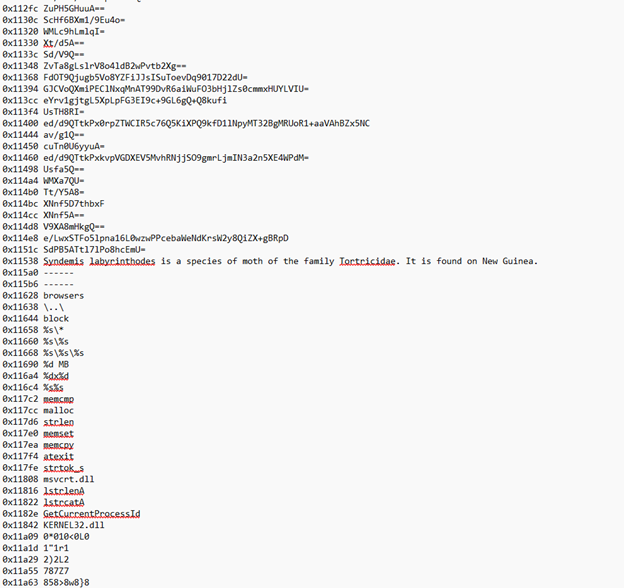
Figure 1- Strings in file
Trying to do a straight Base64 decode of the strings did not provide any useful information.
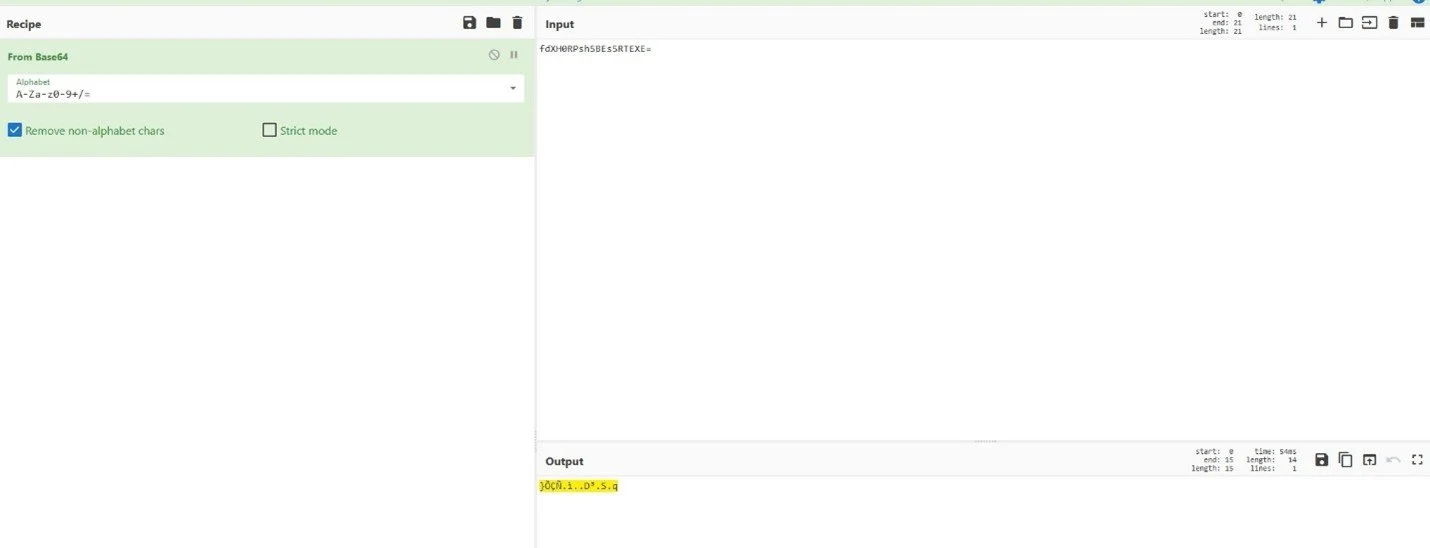
Figure 2-Base64 decode
Using Capa did identify some strange behavior of the file and indicated that there may be more to this executable, such as capability of using RC4 encryption, and Base64 encoding.

Figure 3- Capa results
Using Speakeasy Emulator, it did not provide any useful information except that the length of one string kept getting checked. This string got checked numerous times that Speakeasy hit the maximum number of API calls and exited out.
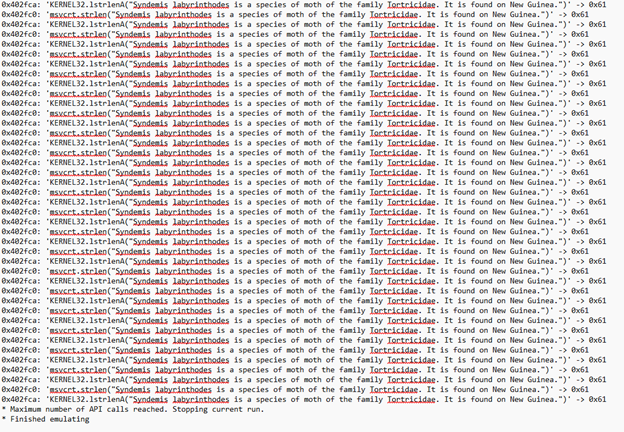
Figure 4-Speakeasy results
When this file was executed within a malware analysis lab, nothing of any significance was detected on the system. Analysis did not reveal any callouts to a C2 server.
At this point, it could be said that the file is not malicious, and it could be overlooked by some security analysts.
Code Analysis and Reverse Engineering
When put into a disassembler and decompiler such as IdaPro or Ghidra, this file will attempt to thwart analysis by using anti-analysis techniques, such as the Rogue Byte technique, which is defined as a jump instruction to the middle of an address space.
A decompiler may not be able to process the code correctly, throwing off an analyst in this case. However, running it in a debugger or when this is executed on a system, the jump will be read correctly. Looking at the screenshot below it will look like the first function called is a FUN_0040ee36, which is not really the case. There are two jump statements before the call to the first function. The jump statements are comparing whether a certain value is zero or not. In both cases, it says to jump to an address of 0x404d40e+1 or, in other words, 0x404d40f, which would be in the middle of the instruction located at 040d0e.
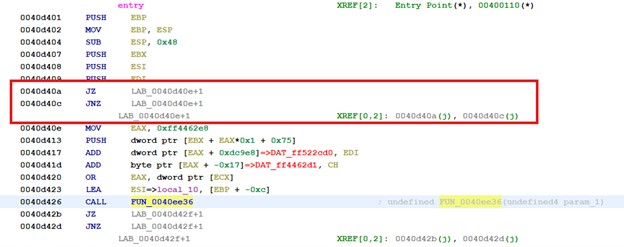
Figure 5-Jump to middle of instruction
Re-disassembling the code to start at the location of the jump does show the true steps that will take place. It shows that after it does jump to the address the first function called is FUN_00401786.
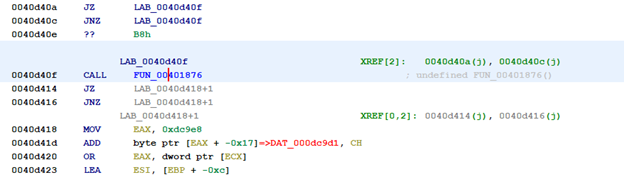
Figure 6-After re-disassembled
Within this function, we see the Base64-looking strings being pushed to another function, which was renamed during analysis as FUN_Decryption. Without going too far into detail on the function FUN_Decryption, it Base64 decodes the string and then runs that value through an RC4 decryption routine. In the middle of the function the malware author tries to throw off analysis by pushing a garbage string of “Syndemis labyrinthodes is a species of moth of the family Torticidae. It is found on New Guinea.” Then will start using APIs for string length.
Switching to a debugger makes it easy to determine what the Base64 strings are by stepping through the malicious file. Using the return values from the debugger can show what the value is that is being decrypted. In Figure 7, the value being pushed is a Base64 string. After the call to the function at 40314c (the decryption function), it will display the decrypted string. For the value of “fdXH0RPsh5Bes5RTEXE=” the string is GetProcAddress.
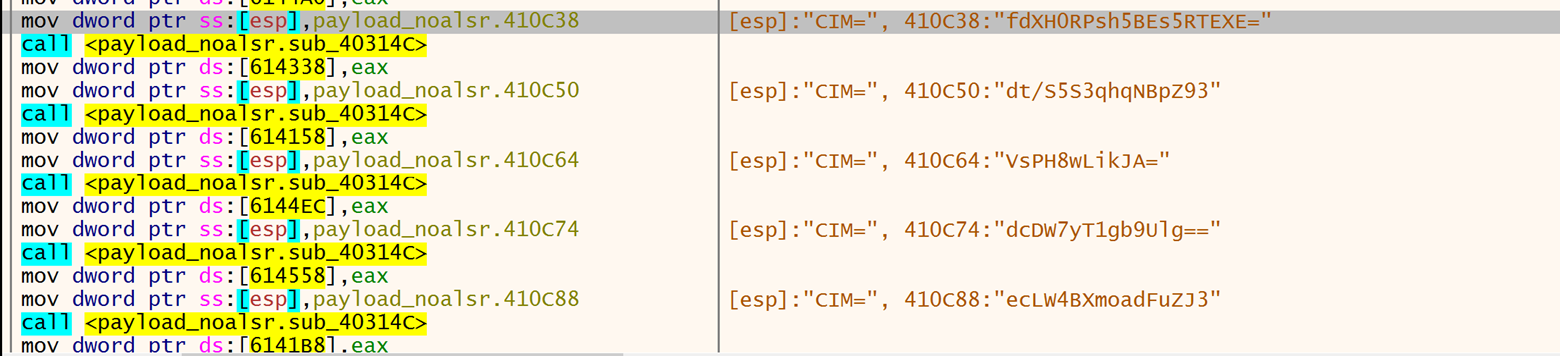
Figure 7-Base64 string before decryption

Figure 8-GetProcAddress
Going through this and copying the decrypted string values into a disassembler helped clarify the intention of this file and reveal some of the anti-analysis techniques that were employed.
For example, one of the self-defending techniques discovered after decrypting the strings is a time check. In this part, if the time difference is too high it will jump out of the process and exit out, giving the appearance that it is not doing anything malicious. Providing a patch to the instruction can bypass this check. We see the comparison being made at 0x40d3e2, with the jump statements below.
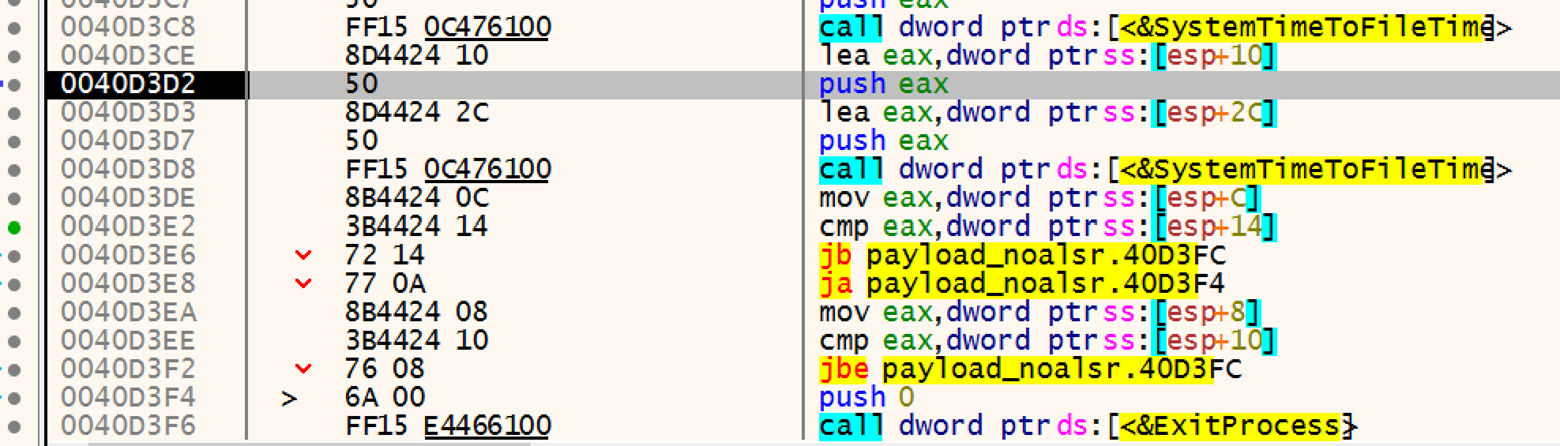
Figure 9-Time check
Changing the instruction at address 0x40d3e8 to also jump to the address of 0x40d3fc will bypass this defensive technique and continue with the process.
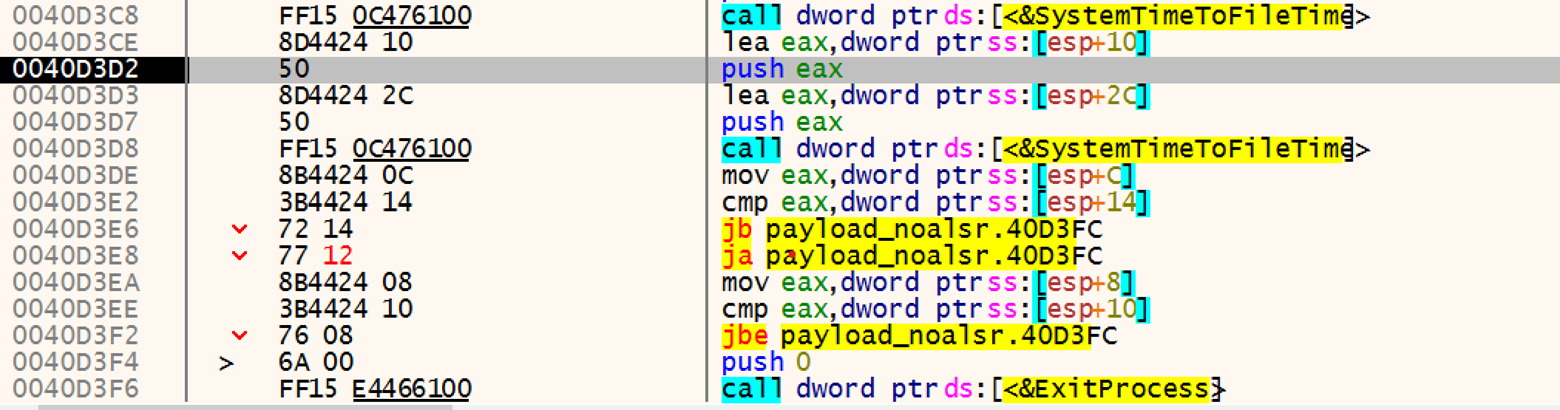
Figure 10- Patching time check
After bypassing this anti-analysis technique, the true capability of the file is revealed. More of the Base64 strings will be decrypted and can provide the IP address of the C2 server along with SQL commands.
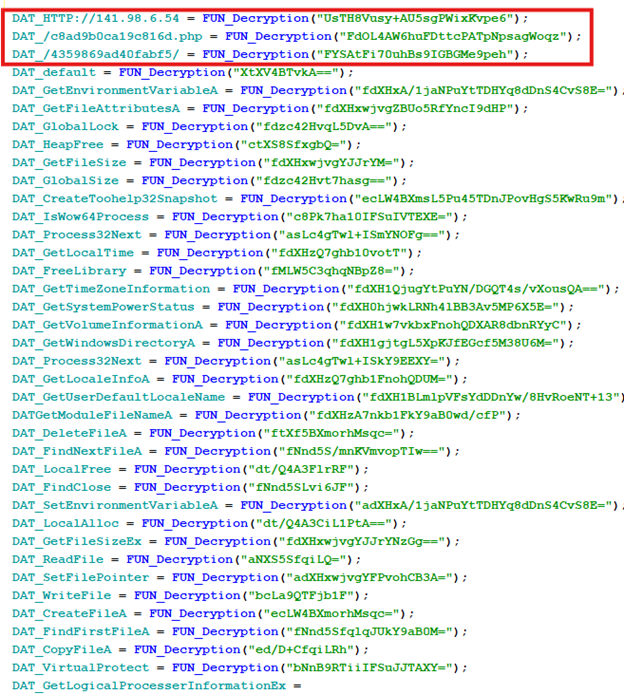
Figure 11- IP address & URL in decrypted strings
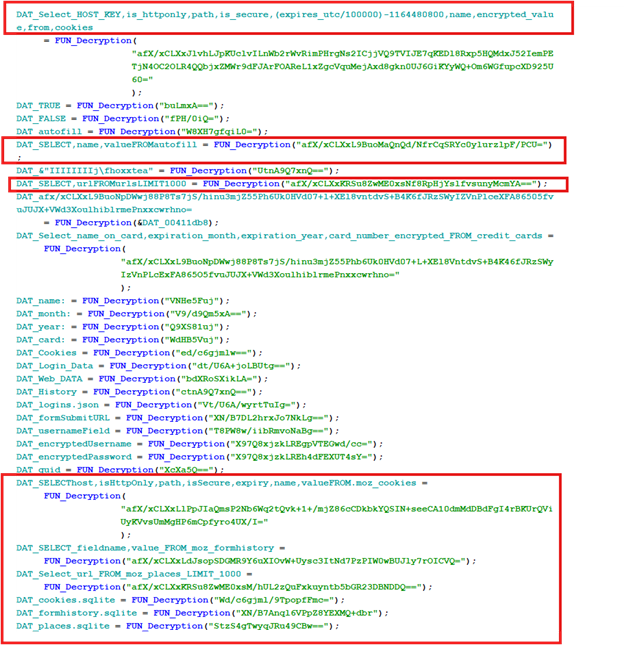
Figure 12-SQL strings in decrypted strings
References:
https://www.virustotal.com/gui/file/b1ef7cd09d4cb6f31d3091a33071a12e81164ddb5dc2 c8e4262b64207d87724a/details
